Impossible Mission II
action platform game for Commodore 64, 1988
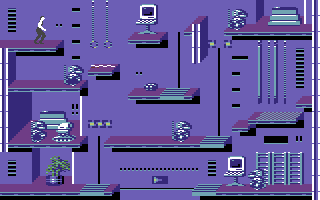
------------------------------------------------------------------------------
OBJECTIVE

You as the Agency's Field Agent must
reach several objectives to prevent the
world from being destroyed. Firstly, you
must assemble the 3-digit pass code for
each tower, while at the same time
avoiding and fighting off Elvin's
robots, using his own security system to
help you. Then you must locate and open
Elvin's safes and recover the musical
sequences locked inside. After securing
the musical sequences you must tie them
together into a full melody that will
open the express elevator doors to
Elvin's central tower control room.
Finally you have to find the correct
computer terminal in Elvin's control
room that will disarm the missile
launch codes before they destroy you and
the world.

You score points by entering towers,
exploring rooms, finding passcode
numbers and reaching the central control
room. The sooner you reach the control
room, the more points you earn.

KEYBOARD CONTROLS

Pause           RUN/STOP
Restart         RESTORE
Commit suicide  C=

STARTING PLAY

While the game is loading, you will see
an outside view of Elvin's tower
stronghold on the screen. When loading
is completed, you will see your agent
inside an elevator in a random tower of
the stronghold. The display on the
bottom of the screen is your pocket
computer.

CONTROLS

In the elevators: Push the joustick
FORWARD or BACK to go up or down. Push
the joystick RIGHT or LEFT to enter a
corridor.

In the corridors: Push the joystick LEFT
or RIGHT to move along the corridor.
Running off the edge of the screen will
take you into a room or another section
of corridor.

In the rooms: Push the joystick LEFT or
RIGHT to move in either direction. If
you press the FIRE BUTTON, your agent
will do a forward flip, useful for
leaping over robots, jumping to higher
levels and somersaulting over gaps in
the floor and over low walls. PUSHING
the joystick BACK will put your agent in
a crouching position. This position is
required for laying a bomb or mine.

On lifting and sliding platforms: If you
are standing on a striped lifting
platform (you can see the vertical track
in the wall), push the joystick FORWARD
or BACK to go up or down. If you are
standing on a striped sliding platform
(you can see the horizontal track in the
wall) push the joystick FORWARD or BACK
followed by LEFT or RIGHT to move the
platform.

GAME PLAY

As you explore Elvin's tower complex you
can check your location and the rooms
you have explored with your pocket
computer. The pocket computer's display
appears at the bottom of your screen any
time your agent is in a corridor or
elevator. A map of the current tower and
connections to two neighbouring towers
shows in the centre of the display. A
dot of light shows your location in the
tower. Any room you have entered appears
in black. An overhead view of the tower
complex appears to the left of the map
display on the pocket computer. It too,
has a light showing your location as
well as a lighted display of your
current tower number.

SEARCHING FOR CODES

Search as many obkjects in each room as
possible. These objects range from
automobiles in Elvin's garage tower to
athletic equipment and lockers in his
gymnasium tower. Don't overlook house
plants and pictures on the wall either.
Search each object by standing directly
in front of it and pushing the joystick
FORWARD.

The word 'Searching' will appear in a
box near your agent's shoulder. You will
also see a horizontal time line
indicating how long the search will
take. You must continue to hold the
joystick FORWARD until the time line
disappears. If your search is
interrupted for any reason (usually a
robot bearing down on you), you can go
back to the object and resume searching
where you left off. Each object
disappears after it is searched.

One of four things will appear above
your agent's shoulder when he's
finished searching an object:

* The word 'Nothing' indicating you've
  drawn a blank.
* A passcode number.
* A security terminal command icon.
* An extension of time.

USING SECURITY TERMINALS

You can use the security terminal
commands you have collected at any
security terminal in Elvin's complex.
These terminals are usually located near
the entrance inside each room. They look
like television sets with darkened
screens facing toward you.

To use a security terminal, move
directly in front of it and push the
joystick FORWARD. The security terminal
screen will fill your display. Security
terminal command icons and the number
you have available appear on the screen.
These include:

Platform symbol - resets vertical lift
platforms.

Platform symbol - moves the floor
segments left or right.

Electric plug - temporarily deactivates
robots.

Light bulb - turns on lights in
darkened room (can be used in any room
within a tower to light other rooms in
the tower).

Time bomb - arms time bomb that can be
placed by agent to blow up a safe (pull
BACK on the joystick and press the FIRE
BUTTON to place the bomb). The bomb
explodes a few seconds after it is
placed allowing the agent to go back to
the safe and search for pieces of music.

Mine - arms mine that can be placed by
agent. Mine explodes whenever anyone
including field agent makes contact with
it. It blows a large hole in the floor
that the agent can only cross with a
leaping somersault.

Push the joystick LEFT or RIGHT to move
along the command icons and press the
fire button to select whichever one you
want to use.

POCKET COMPUTER

Your pocket computer is an amazing
device that not only locates you in
Elvin's complex, it also helps you
assemble the passcode that lets you move
from tower to tower with its built-in
tape recorder you put together the
musical sequence you need to get into
Elvin's central tower. Your computer
also shows you how much time you have
left before Elvin destroys the world.

To activate these last two functions,
you must be standing in a corridor or
elevator and press the FIRE BUTTON.

Note you cannot use the pocket computer
in any of the rooms. Pressing the FIRE
BUTTON in a room will make you do a
somersault.

When you activate the functions, a hand
appears near three buttons at the
bottom right of the screen. The right
button has three numbers on its surface.
The centre button has the drawing of a
tape cassette deck. The left button has
the word 'OFF' written on it. Above
these buttons you will see three sets of
up and down arrow buttons.

You can move the hand with the joystick.
To select a button, move the hand on top
of it and press the FIRE BUTTON. When
you select the number button, the tower
complex map disappears and three windows
appear in its place. This is where the
three digit passcode to enter the
neighbouring towers is assembled. The
numbers are in three different colours
and each colour appears in its own
window. When you move the hand to the
up and down arrow keys and select one
with the FIRE BUTTON. Numbers you have
found in the tower appear in the windows
to the left. There may be duplicates.
When you find the correct number the
'Found' indicator below the windows will
light up. Go on to the next window and
find the next correct number. When all
three numbers for the passcode are
found, the 'Complete' indicator below
the windows will light up. You can now
move through the security access doors
into a tower next door.

When you have collected one or more
musical sequences from Elvin's safes,
you can play them on your pocket
computer. Move the hand over the
cassette button and press FIRE BUTTON. A
tape cassette deck complete with
standard play, fast forward and rewind
controls appears in the centre of your
pocket computer. Rewind then press play
and any musical sequences you have
collected will play. Listen to them
carefully because there may be
duplicates. A digital tape counter helps
you keep track of where you begin a
musical sequence. Use this to help you
record a new sequence over duplicate
piece of music as you collect them from
the safes in each tower. When you
collect and play six non-duplicate
musical sequences linked together on
your tape recorder as a song, you can
enter the express elevator to Elvin's
control room.

You MUST record a musical sequence
before you leave a tower because you
can't return to a tower once you've left
it. If you forget to record the music in
each tower's safe, you can't win the
game. However, you might get really
lucky and still win the game IF the
music you forgot in a tower's safe is a
duplicate.

ELVIN'S ROBOTS

The basic security sentrybot: The most
common and most dangerous, these are
armed with high voltage plasma guns. It
can fire any time it detects a human
within six feet and they never miss at
this range. Humans always die as a
result of the weapon's massive
electrical discharge. Humans have one
advantage however in that they have
greater mobility. You can dodge sentry-
bots with a well timed somersault.
Sentrybots cannot leave their assigned
floors or platforms, and may be found in
any room.

Minebots: Encountered in rooms in any
tower, they crawl around and lay mines
at random. The mines are visible and
easily detected. Unlike the mines a
player can lay, they have no effect on
the floor.

Pestbots: Relatively harmless but
annoying, these appear in any tower.
They constantly ride the lift platforms
and mess up a player's lift platform
strategy. They are not dangerous.

Squatbots: Small robots that squat on
the floor like a turtle, may be
encountered in any tower. With good
timing, you can step on one and use it
as a stepping stone to leap higher in
the air. However, after three seconds it
will rise up and smash you against the
ceiling if you're not careful.

Bashbot: The second most common robot
type, found in all towers, it is shaped
like a mini bulldozer. Upon detecting
you it will attempt to shove you off the
edge of the nearest platform or into a
nearby wall. Sometimes if you encounter
one near the door into a room, he will
shove you back into the adjacent
hallway.

Suicidebot: When it senses a man is
near, it leaps to its death trying to
take the man with it. May be found in
any tower.

ELVIN'S EXPRESS ELEVATOR

You can find doors to Elvin's express
elevator between the inter-tower
security doors in either the underground
passageways or the aerial hallways. Stop
in front of the express elevator and
push your joystick FORWARD. You will
enter the elevator and reappear in
Elvin's control room.

ELVIN'S CONTROL ROOM

This is an extremely complex room filled
with robots. It has security terminals
so you can use your collected security
commands to help you. Notice the three
terminals in the centre of the room. One
of these can be used to deactivate the
missile launch control codes and save
the world. The other two will kill you.
Select a terminal, stand in front of it
and search it by pushing your joystick
FORWARD. If you are lucky, you will
deactivate the control codes and
confront Elvin.

SCORING

A scoreboard will appear if you
successfully end the game or if you die
too many times while you are in Elvin's
control room or if time runs out. This
signals the end of the game. You earn
points for entering each room, entering
each tower and for completing the
mission.

STARTING A NEW GAME

You can start a new game any time by
pressing the RESTORE key. The rooms and
robots will be rearranged and the
computer will generate a new set of
passcodes. Pause the game at any point
by pressing the RUN/STOP key.
------------------------------------------------------------------------------
Some useful keyboard shortcuts
------------------------------------------------------------------------------
       [PAUSE] - stop/continue game
          [F9] - quick load game state
         [F12] - quick save game state (still stored after leaving the site)
         [F11] - toggle fullscreen mode
  [ScrollLock] - quick switch control ports
    [PageDown] - make a screenshot (320x200)