International Soccer
football game for Commodore 64, 1983
------------------------------------------------------------------------------
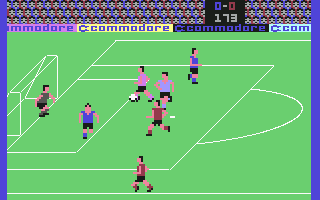
Commodore's new INTERNATIONAL SOCCER game is by far the most realistic sports
game available for the 64. This is a game that demands strategy and skill to
master. This game challenges the best, but it's still fun for the less
skilled player. Countless game details make this an outstanding version of
soccer, with strikingly accurate and exciting play quality.

STARTING THE GAME

The SOCCER cartridge must always be inserted or removed from the COMMODORE 64
with the power OFF. Insert the cartridge, with the label side up, into the
expansion port in the back of the computer. After turning on the computer,
the title screen is displayed for about 15 seconds. Then the introductory
screen appears. If you do not press any function keys or the fire button,
the computer enters the DEMO mode. Press the fire button or move the joystick
to return to the title screen.

SPECIAL KEYS & FUNCTIONS

If you don't like the color combination blue against red you can change both
teams to another color by pressing the F1 key to change the color of the
player displayed on the left hand side of the screen, and the F3 key for the
player on the right. The player on the left represents the team controlled by
the joystick in port #2. The player on the right is the team directed by the
port #1 joystick. Your team can be any of the following colors: blue, red,
yellow, orange, white or gray. If you have a black and white television,
press the F7 key for non-chroma black and white players.

You can play soccer with two players or against the computer. When playing the
computer, you can choose the skill level of your opponent, from 1 to 9, by
pressing the F5 key. Keep pressing the key until you reach the skill level
you want. A level 9 team plays letter-perfect soccer, passing crisply,
shooting accurately, and playing tough defense. A level 1 opponent is
eminently beatable, an adequate opponent for a young child.

KEY FUNCTION

F1 Select color for team defending left goal at start of game

F3 Select color for team defending right goal at start of game

F5 Select computer opponent and skiil level (1 to 9)

F7 Select non-chroma players for black and white TV

After selecting colors and opponent, press the fire button on the joystick to
start the game. The whitle blows to signal the beginning of play, and the
running clock starts timing the first halt. There are two halves, lasting 200
units of time each. The teams switch goals after the first half.

MOVEMENT

You directly control one player with your joystick at any given time. This
player changes to a lighter shade of the team color so that he is easily
recognized. In other words, a player on the blue team turns light blue, a
player on the red team changes to pink, etc_ The player controlled by the
joystick moves in the direction the joystick is pushed. Press the fire button
to kick the ball. A player always kicks the ball in the direction he is
facing.

The player that is under direct joystick control is based on ball possession.
The offensive player with the ball or nearest the ball changes color to be
moved around by your joystick. The other players on the team run patterns in
their appropriate zones, related to the movement 01 the ball. The defensive
player that changes color is the one closest to the ball. The other defensive
players play their zone or pursue the ball. Only a portion of the field may
be seen at one time. The area of the field shoVin depends on the location of
the ball. I! a controlled player goes off the screen, a player on screen
changes color to be joystick-controlled.

Players move at different speeds: a player dribbling the ball moves slower
than a player without the ball. This leads to an increased emphasis on a
downfield passing attack. Another way to move the ball downfield is by
getting a player to 'head' the ball. A player heading the ball moves at the
same speed as a player running without the ball. It is possible to become
sophisticated in heading ability so that passing the ball and scoring goals
becomes even more realistic and challenging.

The goaltender is controlled by pressing the fire button only; he
automatically moves in the direction the ball is kicked. Press the fire
button to get the goalkeeper to attempt a save.

If the ball goes out of play, a free kick, goal kick, or corner kick is
awarded. Press the fire button to get the ball to be thrown or kicked back
into play by the proper player. I! the fire button is not pressed, the ball
is brought back into play automatically after a short interval.

The team displayed on the left side of the introductory screen (from control
port #2) has possession of the ball to start the first hal!. The other team
begins the second half with possession. If the score is tied after two
halves, the contest ends in a tie. If there is a winning team, they come back
onto the field for the presentation of a gold cup.

STRATEGY HINTS

Many strategies can be developed for·use against another player or the
computer. You'll find what often works against the computer fails against a
human opponent, and vice versa There are many elements of the game that can
be developed, formulated, and refined. This is a game that can be played at
several levels; it can be an easy, straightforward contest or a territorial
struggle in which the winner is determined by superior strategy, skill, and
even an occasional lucky break. It is a fun and challenging game that mirrors
the excitement of real life soccer. INTERNATIONAL SOCCER isn't just a home
video game; it's a sporting event!
------------------------------------------------------------------------------
Some useful keyboard shortcuts
------------------------------------------------------------------------------
       [PAUSE] - stop/continue game
          [F9] - quick load game state
         [F12] - quick save game state (still stored after leaving the site)
         [F11] - toggle fullscreen mode
  [ScrollLock] - quick switch control ports
    [PageDown] - make a screenshot (320x200)