Laser Squad
turn-based strategy game for Commodore 64, 1989
------------------------------------------------------------------------------
INTRODUCTION

Laser Squad is a one or two player tactical wargame system that
accurately simulates many aspects of individual level combat. It will
take some time for a new player to become familiar with all aspects of
the system, and we recommend that you load the program and go through
the first section of this manual which provides you with a basic guide
to playing the game.  The second section should be treated as a
reference manual for the experienced players. Some features of the
system are not implemented with the five scenarios provided with the
main program, but the future scenarios will explore the versatility of
fame play that Laser Squad can provide. The final section in this
booklet provides instructions for the five scenarios provided with the
main program.
______________________________________________________________________

KEYBOARD/JOYSTICK     ACTION

q ................... Up
a ................... Down
o ................... Left
p ................... Right
space/button ........ Select/Fire

______________________________________________________________________

PART 1: PLAYING THE GAME
______________________________________________________________________


OVERVIEW

Laser Squad is played in a series of game turns. Each player, during
his turn, controls a small number of units which represent humans,
droids or other creatures. Each unit has its own individual name and
characteristics which affect the abilities and activity of that unit.
At the start of each game turn each unit is allocated a number of
Action Points (or APs) which are used for performing all activities of
that unit such as movement, combat, manipulating objects etc. Once all
action points are used for each unit, or the player does not wish to
use any more, the 'end turn' option is selected and the other player
(or the computer) takes his turn. The winner of the game is the first
side to accumulate 100 victory points. Victory points are awarded for
various things, such as eliminating enemy units or destroying certain
installations, depending on the scenario being played.
______________________________________________________________________

GAME SET UP

You will be asked whether you want a one player game or a two player
game. If you select the one player option the computer will take
control of the second side. You will then be asked what level you wish
to play at. The number of levels varies between scenarios and the
higher the level other more difficult the computer is to beat. If you
are playing with two players then only the player whose turn it is
should be allowed to see the screen. Each player now selects equipment
and deploys his units.
______________________________________________________________________

EQUIPMENT SELECTION

In each scenario you are allocated a number of Credits to spend on
armour, weapons and ammunition. The first thing you must do is select
armour for each unit. Your units are displayed on the left of the
screen and you select armour for each unit in sequence. Use the UP
and DOWN controls to select the type of armour and press FIRE when you
are satisfied with your choice. If you select '0' then the unit will
have no armour. If you select a number from one to four then the unit
will be given an armour type according to the specifications displayed
in the table on the right of the screen. A full explanation of armour
is included in the reference section.

After you have allocated armour to each unit you then select equipment.
Initially the object selector is highlighted. Use the RIGHT and LEFT
controls to change the object currently selected. Each object's unique
graphics symbol and name is displayed together with the cost of
purchasing the object. In order to allocate and then use RIGHT to add
the currently selected object to that unit's equipment, or LEFT to
subtract the object. You cannot give an object to a unit if you have
insufficient credits, or if that unit's weight or size limits would be
exceeded. Once you are satisfied with your selection press FIRE twice
to continue the game.

All weapons are loaded with ammunition when purchased, but extra
ammunition for each weapon is available. Consult the weapons table in
the reference section for details on weapons and ammunition.
______________________________________________________________________

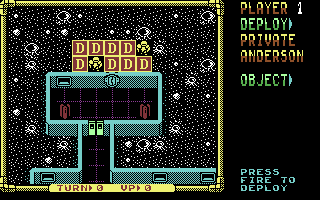
DEPLOYMENT

Each unit is deployed in until all units have been placed on the map.
The deployment mode shows the name and equipment of the unit to be
deployed on the right of the screen and the map window on the left.
Use UP, DOWN, LEFT and RIGHT to move the flashing white cursor around
the map until you have found the deployment square you want. Each
scenario will specify which spaces you can deploy on. Place the cursor
over the deployment square and press FIRE to deploy the unit.
______________________________________________________________________

GAME OPTIONS

Before each game turn starts you will be presented with a menu which
allows you to save and load games. Press the number of the option you
require or press fire to continue with the game.

Change Controls:
Allows you to change the controls of the game between
different joysticks or keyboard (Spectrum only).

Save Game:
Allows you to save the current game.

Load Game:
If you select this option then the current game is abandoned in
order to load a new game.
______________________________________________________________________

CURSOR MODE

At any time the game is in one of three different modes; curor mode,
select mode or fire mode. Each game turn starts in cursor mode which
simply allows you to move the cursor around the map using UP, DOWN,
LEFT and RIGHT. The display on the right of the screen shows
information about the map space under the cursor as follows:

MAP:
The name of the terrain feature such as grass, floor, wall, etc.

OBJECT:
The name of any object on the ground.

UNIT:
The name of any unit under the cursor.

OBJECT IN USE:
The object that the unit is currently using, if any.
______________________________________________________________________

CURSOR MODE OPTIONS

Laser Squad is controlled via a series of menus which are simply lists
of all different options available to you at any time. To display a
menu, which ever mode you are in, press FIRE. Use UP and DOWN to high-
light the option of your choice and press FIRE to select the option.
The options that can be available in cursor mode are as follows:

SELECT:
If the cursor is placed over one of your units with APs remaining then
you will be able to select that unit for movement and other actions.
Once you select this option you will enter selection mode.

INFO:
If the cursor is placed over any unit then information on that unit
can be displayed.

NEXT UNIT:
This option simply moves the cursor to another friendly unit with APs
remaining.

SCANNER:
A strategic map of the entire playing area can be displayed showing
the positions of all your units and any enemy units that are currently
spotted.

CANCEL:
The cancel option in each menu just clears the menu and returns you to
the current mode.
______________________________________________________________________

SELECT MODE

In Select mode the message display on the right of the screen shows
essential information about the unit you have selected. Most important
is the number of Action Points remaining and the direction indicator
which shows which direction the unit is facing. Once you have selected
a unit then the directional controls are used to move the unit as
follows:

LEFT:  Rotate unit left

RIGHT: Rotate unit right

UP:    Move unit forwards in the direction that it is facing.

DOWN:  Move unit backwards.
______________________________________________________________________

SELECTION         WHAT IT MEANS
MODE DISPLAY

CORPORAL   ...... Name of unit
JONLAN
APs |---|  ...... Direction indicator (8 possible directions)
34  | o>|  ...... Action point remaining
25  |---|  ...... Minimum action points needed for opportunity fire
MORALE>    ...... Unit's moral
GOOD
STAMINA>   ...... Unit's stamina
SUPERB
WOUN> 2    ...... Wounds
BURD> 6    ...... Burden
OBJECT>    ...... Object in use
M4000
AUTO-GUN
TERRAIN>   ...... Terrain unit is standing on
ROCK
DUST
PROT> 0    ...... Protection value of terrain
2 <ENEMY   ...... Number of enemy units spotted
______________________________________________________________________

MOVEMENT

Moving a unit will always cost Action Points, depending on the terrain
that is being moved over. Moving diagonally will cost an extra two APs
and rotating a unit 45 degrees costs one AP. If you attempt to move
into impassable terrain the unit will attack the terrain and possibly
destroy it.

You are allowed to move the selected unit over friendly units but you
can never end movement on top of a friendly unit. The only options
available to a unit on top of another are to continue moving or to
select the END MOVE option from the menu. If you select the END MOVE
option then the unit will be placed on the last empty space that it
occupied.
______________________________________________________________________

CLOSE COMBAT

In order to engage in close combat simply move your unit into an enemy
unit. The close combat display on the right will show what weapon the
unit is using (if any), the accuracy (% chance to hit), the AP cost,
the damage and the hit location.
______________________________________________________________________

LINE OF SIGHT

Laser Squad uses a hidden movement system which means that enemy units
will not appear on the map unless they are in the field of vision of
one of your units. A unit's field of vision extends 45 degrees from
the front. Various types of terrain such as walls or doors will block
line of sight. You will not see an enemy unit until it is clearly in
view.
______________________________________________________________________

SELECT MODE OPTIONS

When you press FIRE in select mode you will have a variety of menu
options depending on the circumstances of the unit. Most of these
options cost APs based on a percentage of the units Action Point
Allowance. For example if a unit is allocated 50 APs at the beginning
of the turn then changing an object costs 20% of its AP allowance
which is 10 APs. Actions cannot be carried out if the unit has
insufficient APs (although the option is still included in the menu
list).

The following menu options are available in select mode:

END MOVE:
Ends the selection of the unit and returns to cursor mode. The unit
can still be re-selected provided it still has APs remaining.

FIRE:
If the unit has an object in use then it can be fired or thrown.
Selecting this option changes the display to fire mode.

CHANGE:
If the unit is carrying one or move objects then this option is used
to select an object for use or to change the object in use. The unit's
objects are displayed on the screen with the ammunition amount, weight
and size of each object. The white pointer on the left shows which
object is currently in use, if any. Use the UP and DOWN controls to
move the pointer to the object you want to use and press FIRE to
change object. Performing this action costs 25% of the units Action
Point Allowance.

PICK UP:
If the unit is standing on a space with one or more objects on the
floor then they can be picked up. This option displays all the objects
in the space in a similar manner to the change object display. Use the
UP and DOWN controls to move the pointer to the object you want to
pick up and press FIRE to implement the action. If you don't want to
pick up any objects move the pointer to CANCEL and press fire. This
option costs 50% if the unit has an object in use of 25% if it does not.

DROP:
If the unit has an object in use then it can be dropped costing 10% of
its AP allowance. It is possible to hide an object that is dropped,
depending on the size of the object and the capacity of the terrain
the units is standing on. For example you can hide a grenade in a
plant pot but not a rifle, you cannot hide anything on a floor space
but you can hide most things under a bed. If it is possible to hide
the dropped object then a small menu is displayed asking you whether
you wish to hide the object or not.

LOAD:
If the unit has a ranged combat weapon in use and it is also carrying
the appropriate ammunition for that weapon then it can be loaded with
new ammunition costing 50% of the units AP allowance.

PRIME:
If the unit has a grenade in use which is not primed then it can be
primed at a cost of 20%. Use the UP and DOWN controls to alter the
timer and press FIRE to prime the grenade. The value of the timer
determines when the grenade will explode. If the timer is set to 0
then it will explode at the end of your turn. If it is set to 1 then
it will go off  at the end of your opponent's turn, and so on.

OPEN:
If the unit is facing towards a closed, unlocked door then it can be
opened. The cost is 20% of AP allowance.

CLOSE:
If the unit is facing towards an opened door it can be closed.
The cost is 20% of AP allowance.

UNLOCK:
If the unit is facing towards a locked door and it is using the
correct key then the door an be unlocked. The cost is 25% of AP
allowance.

LOCK:
If the unit is facing towards an unlocked door and it is using the
correct key then the door can be locked. The cost is 25% of AP
allowance.

SCANNER:
The strategic map can be displayed with no AP cost.

CANCEL:
Clear the menu and return to movement.
______________________________________________________________________

FIRE MODE

When you select the FIRE option the main display will change from a
perspective amp to a Line of Fire map which shows all the terrain that
blocks shooting or throwing. All units are replaced with a blob
depicting the target area of each unit. The square cursor is replaced
by a flashing cross-hair cursor for targeting shots. The information
display on the right shows the weapon being used and the essential
information for ranged combat (see fire mode display). In order to
fire a weapon move the cross-hair cursor to the desired target point,
press FIRE to display the fire mode menu and select the type of shot
you require. You will not be able to fire a shot if the cursor is
outside the unit's field of vision.
______________________________________________________________________

FIRE MODE         WHAT IT MEANS
DISPLAY

SNIPER     ...... Name of weapon
RIFLE
APS> 34    ...... Unit's action points remaining
AMM> 12    ...... Ammunition in weapon
AUTOSHOT
ACC>  AP>
N.A.       ...... Automatic fire not available for sniper rifle
SNAPSHOT
ACC>  AP>  ...... Accuracy / Action point cost for snapshot
31%   16
AIM SHOT
ACC>  AP>  ...... Accuracy / Action point cost for aim shot
66%   33
THROW
ACC>  AP>  ...... Accuracy / Action point cost for throw
45%   10
                  note: accuracy includes weapon skill.
______________________________________________________________________

FIRE MODE OPTIONS

Only ranged combat weapons will have the three fire options for
automatic fire, snap shots and aimed shots. Some weapons are unable to
do automatic fire. If the unit is using any other object then only the
throw option will be available.

The following options are available in Fire Mode:

AUTO:
Automatic fire is a burst of continuous fire between two specified
points. A minimum of three shots must be fired and the unit must have
enough AP's for at least three auto-shots in order to select this
option. Once you have selected automatic fire you must select a second
target pint within the unit's field of vision. Press FIRE when you
have moved the cursor to the desired point. You will then be asked to
select the number of shots you wish to fire from three up to the
maximum allowed by the unit's Action Points. Use the UP and DOWN
controls to change the number of shots and press FIRE to execute the
shots.

SNAP:
A snap shot is a single shot, but is more accurate than automatic fire.

AIM:
An aimed shot is the most accurate type of shot but requires the most
action Points.

THROW:
Any object can be thrown up to a distance determined by the unit's
strength divided by the object's weight. An object will never be
thrown further than the cursor which allows for fairly accurate
placing of objects. The accuracy of throwing is equivalent to the
unit's agility rating and the cost is 20% of the unit's AP allowance.
If a thrown object hits another unit then the object ca be caught
provided the unit is facing the thrower and has no object currently
in use. If the object is not caught then it will fall at the unit's
feet.

INFO:
If the cursor is over a unit then information on that unit can be
displayed.

END FIRE:
Ends fire mode and returns to select mode.

CANCEL:
Clears menu.
______________________________________________________________________

OPPORTUNITY FIRE

Opportunity fire is an essential feature of the tactics employed in
Laser Squad. If a unit is left with at least half its Action Point
Allowance at the end of the game turn then it will be eligible for
opportunity fire. During your opponents turn opportunity fire will be
triggered when an enemy unit moves into the field of vision of your
unit. Control will switch you in fire mode which allows you to shoot
the enemy unit. Once you select the END FIRE option then your opponent
can continue with his turn.

______________________________________________________________________

PART TWO: REFERENCE GUIDE
______________________________________________________________________


UNIT CHARACTERISTICS

Each unit has a unique set of attributes which affect the game in
various ways.

MORALE VALUE:
Each unit's morale value represents the value of the unit to the rest
of its squad. If the unit is eliminated then the morale of all units
on its side will decrease by an amount equal to its morale value and
all enemy units morale will increase by the same value.

MOVEMENT TYPE:
Different types of unit have different AP costs for certain types of
terrain. For example the droids in scenario one are unable to trample
over the household furniture.

ACTION POINT ALLOWANCE:
This represents the number of Action Points that the unit is allocated
at the start of each turn. However, a unit's initial AP allowance is
modified by a number of factors. the weight of the unit's armour and
the unit's burden are both subtracted from this value.

CONSTITUTION:
A unit's constitution is the amount of damage it can take before its
eliminated.

WOUNDS:
If a unit's constitution is reduced then the unit will receive a number
of wounds which are subtracted from the unit's Action Points at the
start of each turn.

WOUND RATE:
The wound rate is the number of constitution points lost needed to
generate one wound.

STAMINA:
This value represents the physical fitness, or energy, of the unit.
If a unit spends more than half its APs on energetic tasks like
movement then stamina will be reduced. Unused APs will help recover
stamina. If Stamina reaches such a low level that the unit is feeble
then it will receive half its AP allowance at the start of each turn
until stamina is recovered through rest.

MORALE:
A unit's morale is adversely affected if friendly units are eliminated
or if a unit is wounded. Morale will increase (but not beyond the
initial morale) if enemy units are eliminated. If a unit becomes
panicked then it may drop objects that it is using. The morale of droids
is never reduced.

WEAPON SKILL:
This value affects ranged combat only. Combined with the skill factor
of a weapon the accuracy of firing can be increased.

STRENGTH:
The weight of objects that can be carried is determined by a unit's
strength. In close combat strength can increase the damage done by a
weapon.

AGILITY:
The accuracy of throwing depends on a unit's agility. The accuracy of
hitting in close combat is affected by the attacking unit's agility
and the defending units agility.

BURDEN:
A unit's burden is subtracted from its AP allowance. The burden value
is calculated according to the strength of the unit and the total
weight of all objects carried.

ARMOUR:
Each unit has an armour rating for its front side, left side, right
side and rear. The unit's directional facing and the source of each
shot is used to calculate which armour rating is used in combat
calculations. Armour can be damaged if a damage value from a shot or
hit is greater than the armour rating. A unit's constitution will only
be affected by a damage value which is greater than the armour value.

VICTORY POINTS:
A unit's victory point value is added to the enemies total victory
points when the unit is eliminated.
______________________________________________________________________

WEAPONS AND OBJECTS

There are three basic categories of objects in Laser Squad, weapons,
ammunition and other objects. There are three types of weapon, close
combat weapons, ranged weapons and grenade type weapons. Most ranged
weapons can be used in close combat. Objects can have some or all of
the following characteristics:

WEIGHT:
All objects have a weight value.

SIZE:
All objects have a size value. Units are limited in the total size of
objects that they can carry depending on the type of armour worn. When
there is more than one object in a space then the largest object is
displayed on the map.

CONSTITUTION:
All objects have a constitution value which represents the damage
factor needed to destroy the object.

ACTION POINT:
When an object is on the ground there can be an AP cost for moving
onto it in addition to the AP Cost for the terrain.

CLOSE COMBAT COST:
The percentage of APs required to use the weapon in close combat.

CLOSE COMBAT ACCURACY:
The basic chance of hitting with the weapon. This is modified by a
number of factors in close combat.

CLOSE COMBAT DAMAGE:
The average amount of damage points inflicted by the weapon in close
combat.

CLOSE COMBAT STRENGTH BONUS:
The percentage of a unit's strength that is added to damage in close
combat.

CLOSE COMBAT AGILITY BONUS:
The percentage of a unit's agility that is added to the accuracy in
close combat.

AUTOMATIC FIRE AP COST:
The percentage of a unit's action point allowance used for a single
automatic shot.

AUTOMATIC FIRE ACCURACY:
The percentage chance of being on target.

SNAP SHOT AP COST:
The percentage of unit's action point allowance used for a single
snap shot.

SNAP SHOT ACCURACY:
The percentage chance of being on target with a snap shot.

AIMED SHOT AP COST:
The percentage of unit's action point allowance used for one
aimed shot.

AIMED SHOT ACCURACY:
The percentage chance of being on target with an aimed shot.

SKILL FACTOR:
The value determines how much of a unit's weapon skill is added to
accuracy in ranged combat.

RANGED COMBAT DAMAGE:
The average amount of damage inflicted by the weapon in ranged combat.
If the weapon has explosive ammunition, or if the weapon is a grenade
type, then this value represents explosive power.

AMMUNITION:
The type of ammunition that is used if the object is a ranged
combat weapon.
______________________________________________________________________

CLOSE COMBAT CALCULATIONS

The accuracy of close combat is determined by the sum of the following
factors:

1. The basic close combat accuracy of the weapon.
2. Add the agility factor determined by the weapons agility bonus and
   the attacking unit's agility.
3. Subtract all the enemy unit's agility if it is being attacked from
   the front.
4. Subtract half the enemy unit's agility if it is being attacked
   from the side.
5. Subtract a quarter of the enemy unit's agility if it is being
   attacked from the rear.

The damage in close combat is determined by the sum of the following
factors:

1. The basic close combat damage of the weapon.
2. Add the strength factor determined by the weapons strength bonus
   and the attacking unit's strength.
3. Add a random factor which modifies the damage value calculated so
   far between 50% and 150%.
4. Subtract the defending unit's armour rating for the side in which
   it is hit.
5. Subtract the protection value of the terrain occupied by the
   defending unit.
______________________________________________________________________

RANGED COMBAT CALCULATIONS

The accuracy of ranged combat is determined by the sum of the
following factors:

1. The basic accuracy of the weapon depending on the type of shot.
2. If the shot is a snap shot then add the skill bonus determined by
   the weapons skill and the firing units weapon skill.
3. If the shot is an automatic shot then only add half the calculated
   skill bonus.
4. If the shot is an aimed shot then add double the calculated skill
   bonus.

Ranged combat damage is determined by the sum of the following values.

1. The ranged combat damage value of the weapon.
2. Add a random factor which results in a damage amount between 50%
   and 150% of the initial damage value.
3. Subtract the target unit's armour rating for the side in which it
   is hit.
4. Subtract the protection rating of the terrain occupied by the
   target unit.

______________________________________________________________________

PART THREE: THE SCENARIOS
______________________________________________________________________


SCENARIO ONE: THE ASSASSINS

INTRODUCTION

The Marsec corporation manufactures the best weapons in the galaxy,
but its boss, Sterner Regnix, uses unsavoury methods to extract the
best from his top scientists. The use of mind control drugs and
cybernetic implants is widely used, but officially denied by Marsec.
The inter-stellar Trading Standards Authority is powerless to
intervene. A small band of ex-employees have decided to assassinate
Sterner Regnix. They have located his private home on the planet CX-1
and will stop at nothing until Sterner is dead.

DEPLOYMENT

ASSASSIN SQUAD:
Deploy on the red and yellow deployment squares around the house.
Entrance to the house can be gained through opening the east or west
doors.

DROID SQUAD:
Sterner Regnix and his body guard of combat droids deploy on the blue
squares inside the house.

VICTORY CONDITIONS

ASSASSIN SQUAD:
If the Assassins manage to eliminate Sterner Regnix they win the game.

DROID SQUAD:
The droid squad wins if they eliminate all the assassins and Sterner
Regnix remains alive.
______________________________________________________________________

SCENARIO TWO: MOON BASE ASSAULT

INTRODUCTION

The Omni Corporation's moonbase on Arid - 6 holds security information
on the 30 billion population of galaxy sector nine. Somewhere in sector
nine is the rebel star system, the infamous 'Rebelstar' which still
remains a secret from all its enemies. However the Arid - 6 moonbase
represents the biggest threat to the rebels so far with an increasing
amount of data on rebel movements. A small band of rebels have
penetrated the moon's outer defences and are poised to launch an attack
on the moonbase itself.

DEPLOYMENT

LASER SQUAD:
Deploy on the red and yellow squares outside the moonbase. Entrance
can only be gained by opening the airlocks.

OMNI CORP:
Deploy on the magenta squares inside the moonbase.

VICTORY CONDITIONS

LASER SQUAD:
A sufficient number of Databanks and Analysers must be destroyed to
guarantee victory. A Databank is worth five victory points and an
Analyser is worth two. The Laser Squad wins if 100 victory points are
gained.

OMNI CORP:
The Omni Corporation wins if all the Laser Squad is eliminated.
______________________________________________________________________

SCENARIO THREE: RESCUE FROM THE MINES

INTRODUCTION

A routine mission has gone badly wrong. A reconnaissance mission in
one of the Metallix corporation's  mine installations has resulted in
death of most members of a rebel squad. However all is not lost. Three
members of the squad have been imprisoned on one level of the mine and
they have vital information on the mine complex. A small squad has
hastily been assembled to free the prisoners.

DEPLOYMENT

LASER SQUAD:
Deploy on the red and yellow squares on the top left and top right of
the map.

METALLIX CORP:
Deploy on blue squares in the mine complex.

VICTORY CONDITIONS

LASER SQUAD:
All three of the prisoners must escape to guarantee victory. Once a
prisoner is released from his cell move him to an elevator door and
move into the elevator to escape.

METALLIX CORP:
The Metallix corporation wins if at least five of the rebels are
killed.
______________________________________________________________________

SCENARIO FOUR: THE CYBER HORDES

INTRODUCTION

In this scenario a small band of rebels must defend a rebel planet
station from attack by an imperial droid squad on the large planet of
Azar. The base contains seven stabiliser cores which prevent seismic
instability under the planets thin crust. The imperial squad leaders
have pinpointed the weaknesses in Azars defences and have assembled a
squad designed for the task of destroying the cores. If they succeed
the existence of the entire rebel colony on Azar would be threatened.

DEPLOYMENT

REBEL SQUAD:
The rebels must deploy on the red squares inside the main base area
on the right of the map.

DROID SQUAD:
The Droids must deploy on the blue deployment squares on the top left
and bottom left of the base.

VICTORY CONDITIONS

REBEL SQUAD:
In the two player game the Rebels must eliminate all eight of the
droids in order to win. In the one player version the droids receive
reinforcements. The Rebels must destroy 100 victory points worth
of droids in order to win.

DROID SQUAD:
The Droid squad wins if at least five of the stabiliser cores are
destroyed or if all the Rebel squad are killed.
______________________________________________________________________

SCENARIO FIVE: PARADISE VALLEY

INTRODUCTION

The destruction of the planetary stabiliser base has left the Azarian
colony in ruins. Volcanic eruptions have destroyed most of the major
installations and the Imperial assault ships hover above the
atmosphere like vultures waiting for their prey to die. Such a massive
attack on such a small colony could only have one objective - to
locate and capture the rebel blueprints for their advanced starfighter.
Rather than destroy all their work the Rebels have transferred all the
data into a small security device. A squad is assigned the task of
escaping from the colony with the device in order to reach the distress
beacon on the western plains. However the journey is not easy. The
route through Paradise Valley is very dangerous because all the local
wildlife is hostile and deadly. An underground network of tunnels can
make the journey easier, but the entrances and exits are all hidden.
A sentient race known as the Sectoids tend to collect and store
weaponry taken from humans unfortunate enough to meet them, and they
have the ability to use these weapons as well. In the valley above the
vegetation provides cover for the viscous venomous splurges whose
acidic spit is lethal. Only the most ingenious squad leader could
possibly negotiate Paradise Valley.

DEPLOYMENT

REBEL SQUAD:
The Rebels must deploy on the red and yellow squares on the left hand
side of the valley.

ALIENS:
The Aliens do not have a deployment phase. They are deployed randomly
in their natural terrain.

VICTORY CONDITIONS

REBEL SQUAD:
The Rebels must take the security device, which is initially carried
by Corporal Hansen, over to the right hand side of the valley.

ALIENS:
The Aliens will win if all the Rebels are killed.

LASER SQUAD WEAPON CHART
________________________________________________________________________

                               CLOSE COMBAT
                               -------------
                                        %
                            A           S  %
                            P           T  A                    %   R  A
                        C               R  G   %     %     %    S   A  M
                        O   C           E  I  AUTO  SNAP  AIMED K   N  M
                        N   O           N  L  SHOT  SHOT  SHOT  I   G  O
                        S   S     %     G  I  ----  ----  ----  L   E
                        T   T     A     T  T     A     A     A  L   D  C
                        I         C     H  Y  A  C  A  C  A  C         A
                  W     T   O     C  D        P  C  P  C  P  C  F   D  P
                  E     U   N  %  U  A  B  B     U     U     U  A   A  A
                  I  S  T      C  R  M  O  O  C  R  C  R  C  R  C   M  C
                  G  I  I   M  O  A  A  N  N  O  A  O  A  O  A  T   A  I
                  H  Z  O   A  S  C  G  U  U  S  C  S  C  S  C  O   G  T
WEAPON            T  E  N   P  T  Y  E  S  S  T  Y  T  Y  T  Y  R   E  Y
------------------w--s--c--ap--close-combat---auto--snap--aim--sf---d--a
AUTOMATICS:
M4000 AUTO-GUN   10 12 106  2 25 40  8 20 10  3  5 25 16 50 40  8  46 20
MARSEC AUTO-GUN  12 14 116  2 25 38 10 20  9  6  5 25 18 50 45  8  58 20
L50 LAS-GUN      16 14 120  2 33 34 10 17 10  5  4 20 12 50 24  5  30 40
HEAVY LASER      28 34 126  3 50 24 11 17  7  3  3 17 10 33 16  6  45 50
MK-1             14 12 136  1 25 36  8 17 13  8 12 33 24 33 57 10  53 30
MS AUTO CANNON*  26 30 120  3 33 26 11 17  7 13  8 25 20 50 40  7  78 12
M50 AUTO PISTOL   5  4 103  0 25 26  5 25 13 10  3 20 12 50 30  5  42 12
------------------w--s--c--ap--close-combat---------snap--aim--sf---d--a
SINGLE FIRE:
SNIPER RIFLE      7  8  98  1 20 52  8 20 13  -  - 33 26 67 56 13  52 12
L80 LAS-GUN      14 18 112  2 25 30  8 17  8  -  - 25 28 50 64  4  48 10
PUMP SHOT GUN     9  9 106  0 25 40  8 20 14  -  - 25 16 50 38  7  64  6
MARSEC PISTOL     6  4 100  0 20 50  6 17 17  -  - 13 10 25 22  7  40  8
ROCKET LAUNCHER* 12 22  86  3 50 26  9 14  8  -  - 33 10 67 18  5 160  1
------------------w--s--c--ap---------------------------------------d---
EXPLOSIVES:
EXPLOSIVE*       15  8  80  0  -  -  -  -  -  -  -  -  -  -  -  -  70  -
AP50 GRENADE*     2  2  60  0  -  -  -  -  -  -  -  -  -  -  -  -  90  -
AP75 GRENADE*     4  3 130  0  -  -  -  -  -  -  -  -  -  -  -  - 160  -
------------------w--s--c--ap--close-combat-----------------------------
BLADES:
DAGGER            1  2  60  0 17 58 20 13 33  -  -  -  -  -  -  -   -  -
LIGHT SABRE       5  4 180  0 20 46 84 17 33  -  -  -  -  -  -  -   -  -
________________________________________________________________________

* Explosive impact
Note: Distance of throw = strength of unit divided by objects weight.

WEAPON                   AMMO CAPACITY & TYPE
---------------------------------------------
M4000 AUTO-GUN ......... 20 - M4000 GUN-CLIP
MARSEC AUTO-GUN ........ 20 - MARSEC GUN-CLIP
L50 LAS-GUN ............ 40 - L50 LAS-PACK
HEAVY LASER ............ 50 - HEAVY LAS-PACK
MK-1 ................... 30 - MK-1 CLIP
MS AUTO CANNON ......... 12 - CANNON CLIP
M50 AUTO PISTOL ........ 12 - PISTOL CLIP

SNIPER RIFLE ........... 12 - RIFLE CLIP
L80 LAS-GUN ............ 10 - L80 LAS-PACK
PUMP SHOT GUN ..........  6 - SHOT GUN CLIP
MARSEC PISTOL ..........  8 - PISTOL CLIP
ROCKET LAUNCHER ........  1 - ROCKET


WEAPON NOTES

M4000 AUTO-GUN: High rate of fire for close to medium distances.

MARSEC AUTO-GUN: High powered auto-gun. A bit more accurate than M4000.

L50 LAS-GUN: Low powered with large ammo pack.

HEAVY LASER: Medium power - high rate of fire - very large ammo pack.

MK-1: Best all round auto weapon.

MS AUTO CANNON: Most powerful auto weapon with explosive impact.
                Warning - Use only in wide open spaces.

M50 AUTO PISTOL: Light and cheap auto weapon for close range.

SNIPER RIFLE: Inexpensive, accurate weapon for any range.

L80 LAS-GUN: The most accurate weapon for any range.

PUMP SHOT GUN: Powerful weapon for close encounters.

MARSEC PISTOL: Light and cheap close up weapon.

ROCKET LAUNCHER: Very powerful explosive impact weapon. Use only in
                 wide open spaces. May even destroy walls!

EXPLOSIVE: Good for getting friends out of prison.

AP50 GRENADE: Moderately powerful grenade that can be thrown long
              distances.

AP75 GRENADE: Powerful grenade for up to medium distances.

DAGGER: Cheap close combat weapon. Most effective when used on enemy
        unit from behind.

LIGHT SABRE: Powerful close combat weapon.

________________________________________________________________________

LASER SQUAD TIPS
________________________________________________________________________

1. Select the equipment that best suits the mission. For example: You'll
   need at least 3 explosives to get the prisoners out of prison in the
   "Rescue from the mines" scenario, and you might want to have a couple
   of light sabres in "Paradise valley" to save on ammo when hacking
   through the undergrowth.

2. Don't go through a door if your movement points are almost used up.
   Wait for the next turn when you have full movement points.

3. If possible - ambush the enemy by waiting for them to come to you.
   You will have full movement points to use during opportunity fire.

4. Use your units as a team. One unit might open a door while another
   moves inside, while still another stands ready to fire.

5. Never use up more than half of your movement points unless you really
   need to. Your unit will not have opportunity fire and be at the
   mercy of any enemy unit that moves into line-of-sight.

6. Explosive weapons are usefull for taking out multiple targets but
   they are also good to use against enemy units that are around a
   corner or just behind a door.

7. Sometimes it's good to use one of your less effective units as a
   scout by keeping them outside a building and looking thorough the
   windows to spot enemy units for the rest of the squad inside.
   "Moonbase Assault" comes to mind as the windows are bullet-proof.

8. Generally - Use aim shot for long distances, snap shot for medium
   and auto for close range. These are not hard and fast rules and
   can and should be broken depending on the situation, unit's
   shooting skill, etc.

9. If you notice that the computer controled units are not moving
   very much, be cautious when going through doors and around corners -
   they could be waiting to ambush you. Here's where the grenades come
   in handy.

10 Some objects such as chairs and plants can provide limited cover.

11 Don't bunch up your units when you know the enemy has an auto-cannon
   i.e.- "Cyber Hordes".
------------------------------------------------------------------------------
Some useful keyboard shortcuts
------------------------------------------------------------------------------
       [PAUSE] - stop/continue game
          [F9] - quick load game state
         [F12] - quick save game state (still stored after leaving the site)
         [F11] - toggle fullscreen mode
  [ScrollLock] - quick switch control ports
    [PageDown] - make a screenshot (320x200)