Leaderboard Golf
sport game for Commodore 64, 1986
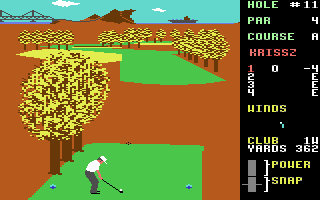
------------------------------------------------------------------------------
SETTING UP THE GAME
-------------------

SELECT NUMBER OF PLAYERS
LEADERBOARD EXECUTIVE EDITION can accommodate up to four players,
press 1, 2, 3 or 4.

ENTER PLAYER NAMES AND ABILITY LEVELS
Type in the name for the 1st player (up to 8 characters) and press
RETURN.

Now select the ability level for the 1st player.  Each player can
compete under conditions which match his or her level of ability and
experience.  Press (N) for NOVICE, (A) for AMATEUR, or (P) for
PROFESSIONAL.  Below is a description for each level.

ABILITY

Novice          Beginner Level - When a shot is taken on this level,
                it will not hook or slice or be affected by the wind.

Amateur         Intermediate Level - Shots at this level will not be
                affected by the wind.

Professional    Advanced Level -  No restrictions on wind or hook and
                slice.

After entering the NAME and ABILITY for the 1st player, do the same
for each of the other players.

SELECT NUMBER OF HOLES
LEADERBOARD EXECUTIVE EDITION allows you to play from 18 - 72 holes
with computerised scoring.  To select the number of holes:
Type:

     (F1)  18 Holes          (F5)  54 Holes
     (F3)  36 Holes          (F7)  72 Holes

PLAYING THE GAME
----------------

SELECT A CLUB
Club selection is made by moving the joystick up or down.  The
following table lists the range of each golf club.

          CLUB         SHORTEST        LONGEST
       1W 1 Wood          156            271
       3W 3 Wood          135            245
       5W 5 Wood          128            234
       1I 1 Iron          110            220
       2I 2 Iron          100            210
       3I 3 Iron          88             202
       4I 4 Iron          70             189
       5I 5 Iron          67             181
       6I 6 Iron          55             169
       7I 7 Iron          50             153
       8I 8 Iron          36             138
       9I 9 Iron          26             117
   PW Pitching Wedge      11             83
        Putter*           1"             64'


 * The computer automatically selects the putter for you when you are
playing on the green (within 64 feet of the hole).  This is the only
club you can use on the green.

AIM YOUR SHOT
Use the cursor to aim the direction of the flight of the ball.  The
cursor is located several yards in front of the golfer.  To Control
the cursor, move the joystick right of left.  If you are playing on
the professional level, be sure to check for wind effect.

WIND
(Professional Level Only).  Wind can have a substantial effect on your
golf shot.  To control its effect, you need to learn to read the wind
indicator on the right side of the screen.

   WHITE - The white stake indicates              |
   wind velocity.  If this marker is              |
   tall, the wind velocity could     --------->   |
   have a substantial effect on your              |
   shot.  The shorter the white stake             |
   the less the wind will be a                   _|
   factor.                                    _ /
                                           _ /    _ /
   BLUE - The blue line indicates -->   _ /  | _ /
   the direction the wind is          /      |/___
   blowing .  The line acts as a
   streamer.  If the lines are
   toward you, the wind is blowing toward you.

SWING THE CLUB AND HIT THE BALL
Once you have selected your club and positioned the cursor to aim your
shot, there are only three more things to do before the ball is on its
way; start the swing, set the power, and snap your wrists to control
hook or slice.

All these are accomplished during the swing sequence and require
careful timing and concentration.  The sequence can be viewed by
watching the golfer or the power/snap indicator.

Step 1   Start the swing by holding down the button.

Step 2   Set the power by releasing the button during the backswing.
         Power is at maximum only at the top of the backswing.
         Releasing the button at the top will set maximum power.
         Releasing the button just before or just after the top will
         reduce the power slightly.  Releasing the button well before
         or after the top will reduce the power.

The amount of power available during backswing is shown on the upper
left portion of the power/snap indicator.  When the button is
released, the setting you have chosen will be locked on the indicator.

                      THE POWER SNAP INDICATOR


   Power Indicator ___
                      `\  |                ___ Down Swing Area
                       __\|           |  /     (Helps time the snap)
                                      |/__
          /    Max -------> ####\\\\
         |   Power          ####\\\\
         |                  ####\\\\
         |     50% -------> ####\\\\
 Release |   Power          ####\\\\
 Button   \                 ####\\\\
 To       /    Min -------> ####\\\\
 Set      \  Power          ======== <------- Max Hook
 Power    /                 ========          (Ball goes left)
         |                  ========
         |               ---========--- <---- Straight
         |                  ========
         |                  ========
          \                 ======== <------- Max Slice
                                              (Ball goes right)
                               /^\
                                |
               Snap             |
               Indicator _______|

Step 3   Set the snap by pressing the button at or near contact with
         the ball.  Snapping just as the club hits the ball (or at the
         Tee Bar on the snap indicator) will produce a straight hit.
         Snapping too soon will cause the ball to "hook" (go left).
         Snapping too late will cause the ball to "slice" (go right).
         When the button is pressed, the point of the snap will be
         locked on the indicator.

The swing sequence then is:Start - Power - Snap or Button - Release -
Button.

The best way to learn to hit the ball straight consistently is to
practice on the driving range.

PUTTING
Once you get within 64 feet of the hole the computer will
automatically place you on the green and remove the pin (the pole with
the flag).  You cannot change clubs at this point since the putter is
the only club you can use on the green.
To putt the ball, you need to do only two things; aim your shot and
set the power.

Use the cursor as before to aim the shot.  The ball will start out in
this direction.  The ball may break left or right depending on the
slope of the green.  To determine the amount of direction of break,
you must learn to read the slope indicator which appears on the green
to the left of the golfer.

Estimate the power needed by noting the distance to the hole.  Press
the button and hold it until the power level is sufficient to reach the
hole and then release it.  The golfer will putt automatically.  Refer
to the figures following.

SLOPE INDICATOR


                              __                               /
                        /     ||                              /   ___
                       |      ||                             /___/
                       |      ||                          __//
            Amount      \     ||                      ___/ /
              of        /     ||                  ___/    /
             Slope      \     ||              ___/       /
                        /     ||          ___/          /    Hole
                       |      ||      ___/             /
                       |      ||  ___/              =====
                        \     ||_/                   / \
                          ___/#'                    /
                      ___/####                     /    \
                  ___/####                        /
              ___/####        ___/               /       \
          ___/####        ___/                  /
      ___/            ___/                     /        \
     /          | ___/                        /
                |/__   Straight              /         /
                       down hill            /
                                           /         /
                                          /        /
                                         /       /
                                        /      /
                                      _/    /
                         Ball --->   //\ /
                                     /_/
                                    /

(This putt is uphill breaking hard left.)

                           POWER INDICATOR

                                         ____ Indicator starts here
                                       /`     when button is pressed.
                                     /
                                   \|/
                                    `
                            /       |
    Pre-putt section --->  |        |
   (for timing only)        \  -----------   1'  \
                            /    |     |          |
                           |     |     |          |
                           |   -----------   8'   |
                           |     |     |          |
                           |     |     |          |
                           |   -----------  16'   |
                           |     |     |          |
                           |     |     |          |
                           |   -----------  24'   |
                           |     |     |         /
                            \    |     |         \   Approximate distance
                            /  -----------  32'  /   ball will travel on
       Power section --->   \    |     |         \   level ground (in feet).
     (Release button        /    |     |          |
      to set power).       |   -----------  40'   |
                           |     |     |          |
                           |     |     |          |
                           |   -----------  48'   |
                           |     |     |          |
                           |     |     |          |
                           |   -----------  56'   |
                           |     |     |          |
                           |     |     |          |
                            \  -----------  64'  /

READING THE SCORE
-----------------

The scoring indicator is displayed on the right of the screen.  The
indicator shows which player is hitting, which players are in the
hole, how many strokes each has taken, and how each player's total
score compares to par for the course.  Par represents the number of
strokes a good player should have used by the time he or she got to
this hole.  If your score is `-5' for example, that means that you are
5 strokes under par or 5 strokes less than a good player (which is
good).  An `E' means you are even par or equal to the good player.
A `5' means you're 5 strokes over par.  The par comparisons do not
reflect the scores for the current hole.

SCORING INDICATOR

  JACK   <--- Name of player now hitting

  1   2   -2 (2 Under Par)
  2   2   -3 (3 Under Par) <---- This player is leading
  3   3   E  (Even Par)
  4   3   +1 (Over Par)    <---- This player is last

 /^\ /^\ /^\
  |   |   |_______ Number of strokes over or under par
  |   |            (Does not include this hole).
  |   |
  |   |___________ Number of strokes taken on this hole (Turns
  |                blue when finished).
  |
  |_______________ Player Number (Turns red when player is hitting).

RULES FOR SCORING
-----------------

(1)  You receive 1 point (stroke) each time you hit the ball,
     regardless of the distance it travels , from the time you tee off
     until you sink the ball in the hole.

(2)  You receive a distance penalty if you hit a ball out of bounds,
     into a water hazard, or into the mud.

(3)  Low score wins.

RULES OF THE GAME
-----------------

(1)  PLAY AS IT LAYS.  You must play the ball from position in which
     it lands.  Exceptions are: out of bounds and those that land in
     the water or mud.  (See below).

(2)  OUT OF BOUNDS.  If your swing takes the ball out of bounds, you
     will hear a BUZZER.  You are penalised distance and the ball is
     returned to its original position.  It is still your turn.

(3)  IN THE WATER.  If your ball lands in a water hazard, you will see
     and hear a SPLASH.  You are penalised distance and the ball is
     automatically placed back at the point from which you took your
     shot in the first place.

(4)  IN THE MUD.  If your ball hits the side of an island, it will
     stick in the mud and have to be replayed.  Occasionally you will
     find other small hazards that do not appear to be grass.  Do not
     land in them as your lie will be considered to be unplayable and
     you will have to hit again, this doesn't include bunkers.

(5)  THE COMPUTER will take the same point of view as the player in
     determining the playability of a ball that has come to rest.
     If, after moving up closer, the ball is found to be in mud or
     water, the computer will place a small pad under the ball so the
     player can hit it.  Just consider it a `lucky bounce'.


METHODS OF PLAY
---------------

1 PLAYER
In this game you play alone, either against par or your own best
score.  You do NOT play against the computer.

2 OR MORE PLAYERS
(1)  After each player has teed off on Hole 1, the player who is
     farthest away from the hole shoots first, the player who is next
     farthest away shoots second, etc.  If, after your shot, you are
     still away (farthest from the hole), it is still your turn.  You
     continue until you are no longer away.

(2)  When a player has hit the ball and his turn is over, his ball
     will not appear on screen again until it is his turn.

(3)  Decide the order in which players tee off when names are typed in
     at the beginning of the game.  This order will determine which
     score readout is yours throughout the game.  If you tee off
     second on Hole 1, the second readout will always indicate your
     score.

(4)  After a hole has been played, the player with the lowest score on
     that hole tees off first on the next hole.  This is called
     "having the honour".  Since the score is kept on each hole, you
     will be able to determine from it who has the honour.  The
     computer also keeps track and automatically changes the colour of
     the score readout for the player who has the honour.


METHODS OF SCORING
------------------

1 PLAYER AGAINST PAR
Compete against your best score and the golf course by trying to come
in under par.  Depending on the course, a very skilled player can
score 10 - 20 strokes under par on eighteen holes.

2 OR MORE PLAYERS
MEDAL PLAY (Singles or Partners).  Winner is determined by total of all
strokes (points) for entire game.  Low score wins.

MATCH PLAY (Singles or Partners).  Each individual hole is awarded to
the player or team with the lowest score on that hole.  At game's end
the player or team with the most holes won takes the game.

BEST BALL (Partners only).  Method of scoring for either Medal or
Match Play.  Best score by either partner on a team is used as the
team's score.

NOTE: If you decide on Match Play or Best Ball game, you will need to
keep track of your scores on a separate sheet of paper.  The computer
does not keep score in this manner.


GAME TIPS
---------

(1)  Be sure to CHECK YOUR CLUB - Check to make sure the golf club you
     want to use is displayed.  When you are making final direction
     adjustment, the golf club can sometimes change accidentally.

(2)  Always go to the Driving Range before starting.  This allows you
     to get the correct timing on your swing.

(3)  Remember that the wind can make a substantial difference to your
     shot, especially short irons and your pitching wedge.

(4)  Try to avoid hitting your ball onto the edge of the green far
     away from the hole.  the greens are large with downhill and
     uphill breaks  and if you are too far from the hole, you may
     require 2 putts to get to the hole.  Remember: You MUST use your
     putter on the green.

(5)  Be extra careful in judging distance over water.  If your ball
     falls short and lands in the water, it'll cost you a distance
     penalty.

(6)  Learn to use the hook and slice.  They can be used to your
     advantage on difficult shots and when the wind is in play.


ADDITIONAL FEATURES
-------------------

DRIVING RANGE - To get to the Driving Range press (R) when the
`Select Player' screen appears.  Exit by pressing (/).

ABORT FEATURE - You can return to the `Select Player' screen from
almost any point in the game by pressing (/).  This will cancel the
game in progress.

REPLAY FEATURE - If you wish to start over at the 1st hole without
changing names, etc., press (P) from the `Select Player' screen.

AUTOMATIC DEMO - If left unattended for one minute, the computer will
start the demo.  You may start the automatic demo by pressing (D) from
the `Select Player' screen.


TROUBLE SHOOTING
----------------

IF YOUR SHOTS HAVE NO POWER - Either you are releasing the button too
soon, too late, or not at all during the backswing.  Press the button
to start the swing and hold it down until the club is at the top
(highest point) of the backswing and then release.

IF YOUR SHOTS CURVE BADLY LEFT OR RIGHT - You are not pressing the
button just as the club hits the ball.  Re-read the section on
"Swinging the Club and Hitting the Ball" and practice your timing on
the NOVICE level.
------------------------------------------------------------------------------
Some useful keyboard shortcuts
------------------------------------------------------------------------------
       [PAUSE] - stop/continue game
          [F9] - quick load game state
         [F12] - quick save game state (still stored after leaving the site)
         [F11] - toggle fullscreen mode
  [ScrollLock] - quick switch control ports
    [PageDown] - make a screenshot (320x200)