Mr. Robot and his Robot Factory
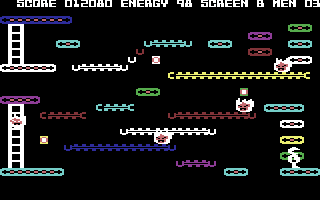
platform game for Commodore 64, 1984
------------------------------------------------------------------------------
SCENARIO

Get ready for a new experience in
computer gaming. As Mr.Robot you'll
thrill to the excitement of jumping over
alienfire, running over treadmills and
bombs, climbing ladders and escalators,
sliding down poles, bouncing off
trampolines, and transporting yourself
through thin air.

Then - when you've mastered all 22
screens and can play MR.ROBOT
blindfolded - you can use the ROBOT
FACTORY and design your own screens!
Any way you like! Up to 22 of them!
You'll be having so much fun you may
forget you're human!

OBJECT OF THE GAME

You must collect all the power pills on
one level before you can proceed to the
next. There are 22 levels in all. Watch
out for alienfire - it can kill you.
Jump over it or touch an energizer
(pulsating square) to energize a force
shield around Mr.Robot. When he's
energized, he can kill the alienfire
just by touching it. This force shield
lasts only a short time before he
reverts to his normal state.

You will encounter many obstacles and
various modes of movement on your
journey through the 22 levels. There are
moving treadmills, ladders, escalators,
poles to slide down, bombs to walk over
and ignite, trampolines to bounce on,
magnets to help you jump further,
transporter tokens to transport you
through thin air to other transporter
tokens, and more!

You begin play with 5 lives. You lose
lives by misjudging your position and
falling or jumping too far or running
out of energy. You can fall 1 and a half
body lengths safely. Win bonus lives by
making contact with life tokens
(circular objects) that are suspended
in the air to various levels. One bonus
life is awarded for each token.

POINT VALUES

Power pills................... 10 points
Bombs......................... 50 points
Energizers .................. 100 points
Bonus robot tokens........... 100 points
Killing alienfire............ 500 points
Killing alienfire
with bombs............. 1000-5000 points
Magnets...................... 100 points
Units of energy
remaining at the
end of a level...... 100 points per unit

JOYSTICK CONTROL

Your joystick should be plugged into
joystick controller jack #1.

Use the joystick to guide Mr.Robot left,
right, up and down - press the fire
button to make him jump (over alienfire,
onto escalators, from platform to
platform, from teleporter to teleporter
etc.).

KEY CONTROL

Press [F1] to start the Mr.Robot game.
Press [F3] to choose levels 1-22 (A-V).
Press [F5] to enter the Robot Factory.
Press [F7] to pause (to collect your
           breath, get a sandwich, call
           your friends to come over and
           see your high score, etc.)
           and [F7] again to continue
           play.
Press [RESTORE] to return to the demo
                mode.

ROBOT FACTORY INSTRUCTIONS

The second part of this awe-inspiring
package is the Robot Factory, which is
like an erector set - you can create up
to 22 screens for use in your own
Mr.Robot game.

Simply press the [F5] key to enter the
factory. You'll notice a panel at the
bottom of the screen which contains the
various parts that make up the game.
You'll also see a small box in the upper
left-hand corner of the screen. This is
your cursor. Use the joystick to move
the cursor to the objects at the bottom
of the screen. Position the cursor over
the object you want to start with, e.g.
the tread. Press the fire button once to
"grab" the tread and then position the
tread anywhere on the playing surface
and press the fire button to "stamp pad"
OR press the fire button AND move the
joystick to "brush" the tread on the
screen.

You can continue to paint with this
object until you move the cursor back
to the bottom panel to "grab" another
object.

The parts of the Mr.Robot screens are
grouped as follows in the panel at the
bottom of the screen:

TOP LINE

* right-moving tread/right cap/
  left-moving tread/left cap
* escalator/pole
* left cap/right cap/open grid/power
  pill grid
* transporter token/bomb
* energizer token/left magnet/right
  magnet/sound toggle token
* ladder
* alienfire
* Mr.Robot
* trampoline

BOTTOM LINE

* disk
* clear
* play
* test

Once something is on the screen it can
be "erased" by grabbing a "blank" from
the bottom panel with the cursor and
painting this over the object to be
erased.

NOTE: You may place only 4 alienfires,
      4 transporters and 1 Mr.Robot per
      screen.

The commands on the bottom line of the
panel are also executed by positioning
the cursor over them with the joystick
and pressing the fire button once.

DISK Accesses the "Disk Command Screen"
     sub-menu:

LOAD Load screen by positioning the
     cursor over the letter
     corresponding to the screen to be
     loaded and press the fire button.
     Use this command to load a saved
     screen for editing.

SAVE Save screen in progress by
     positioning the cursor over the
     letter "A". Press the fire button.
     Save subsequent screens using
     subsequent letters.

EDIT To return to the Robot Factory
     screen. Position the cursor over
     "Y" and press the fire button.

CLEAR Clears a screen in progress.
      You can also clear a screen by
      pressing the [F5] key.

PLAY Loads your series of screens in
     the order in which you created
     them - A to V.

TEST To play test a screen in progress.
     Press [F3] to return to the Robot
     Factory when you're through
     testing your screen.

NOTE: If you decide you don't like
      something while editing a loaded
      screen, just press the [F3] key
      and your previously loaded screen
      will be restored magically!

EDITOR KEY CONTROL

[F3] - Undo.
[F5] - Clear screen.
------------------------------------------------------------------------------
Some useful keyboard shortcuts
------------------------------------------------------------------------------
       [PAUSE] - stop/continue game
          [F9] - quick load game state
         [F12] - quick save game state (still stored after leaving the site)
         [F11] - toggle fullscreen mode
  [ScrollLock] - quick switch control ports
    [PageDown] - make a screenshot (320x200)