Rocket Ball
Sport game for Commodore 64, 1985
------------------------------------------------------------------------------
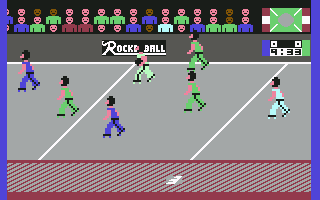
ROCKETBALL is a thrilling game of skill, expertise and outstanding realism.
The action takes place on the circular rocket-ball track, where two roller
skated teams of five players battle it out in a no holds barred goalscoring
contest. Rules are virtually non-existant. The game is played in an
anti-clockwise direction, and lasts 10 minutes. In the event of a draw, two
minutes extra time will be played repeatedly until one team is victorious.

ROCKETBALL presents the ultimate in 2 player participation games, whilst in
its 1 player mode it demands the highest possible skill and dexterity from
its opponent. However, the less skilled players can learn to master the
techniques by starting on the easier levels.

SELECTING OPTIONS
Various options can be selected whilst the title screen is displayed.
You can choose from four teams.- HOUSTON (blue), MOSCOW (magenta),
MADRID (green) and TOKYO (yellow).

Function Keys F1 and F3
Press F1 repeatedly until your chosen team (joystick port 1) is displayed, and
F3 until your chosen team 2 (joystick port 2) is displayed.

Function Key F5
Press this key repeatedly to select 1 or 2 player game or skill levels. On the
one player game these are indicated on the players arms, 11 is the easiest,
66 the hardest.

Function Key F7
Press this key repeatedly to change border colours.

PRESS RUN/STOP AND RESTORE KEYS to exit current game and return to title page.

Playing the Game
You directly control one of your team players with your joystick at any one
time. This player will appear in a lighter shade of the teams colour
selected.

Team	Team Colour	Joystick Cont. Players Colour
MADRID	GREEN		LIGHTGREEN
HOUSTON	BLUE		LIGHTBLUE
MOSCOW	MAGENTA		GREY
TOKYO	YELLOW		WHITE

The joystick  is  used to  control  these players as follows:-

Joystick Controls
JOYSTICK UP            : Move player up track
JOYSTICK UP & FIRE     : Player jumps
JOYSTICK LEFT          : Speeds player up
JOYSTICK LEFT & FIRE   : Throws ball down track to pass/punch player left
JOYSTICK RIGHT         : Slows player down
JOYSTICK RIGHT & FIRE  : Throws ball towards goal/passes up track/punch
                         player right
JOYSTICK DOWN          : Moves  player down track
JOYSTICK DOWN & FIRE   : Player squats or moves to pick ball up.

RAPID movement of joystick will speed up acceleration or deceleration.

For both teams, the player that becomes controlled by the joysticks is decided
mainly by the proximity of the ball. However, other factors will be taken
into account - for example whether that player has fallen or is standing. The
other players on both teams will adopt defensive or attacking patterns
relative to the movement of the player with the ball. The circular track
consists of eight sections, and if a joystick controlled player leaves the
screen as it scrolls, a player on screen changes to become joystick
controlled as above.

All players can attack and defend by pushing and barging other players. They
can also jump and duck to avoid collisions, and pick up the ball when it is
free. Jumping and ducking will also give the best chance of surviving a
collision. In general, a player ducking will knock down one jumping, whilst
either will knock down one skating. Two players colliding doing the same
action will both fall.

The players will skate at different speeds. Players without the ball will move
faster than the one with it and hence be able to catch him up. The 'goals'
are magnetic discs located at each half of the arena, with each teams goals
placed at sections 3 and 7.

Teams defend the goals displaying their own colour, and attack those of the
oppositions colour. Goals change end at each firing of the ball to ensure
fairness.

The Start of the Game

After the colours of the teams have been selected etc., and the fire button
pressed, the two teams will skate in to the arena. A hooter will sound, and
the ball will be fired on to the track from the top right hand side of the
track into section 1. It is then up to the two teams to collect the ball and
score in the oppositions goal.

The best way to collect the ball is to approach from  behind,  and  move the
joystick down with the fire button pressed, as stated on the joystick control
diagram. If correctly positioned, the player will move to collect the ball.
To shoot for goal, move joystick to the right and press the fire button,
again as stated on the joystick control diagram. The ball will be thrown
towards goal, and if timed correctly, will score. After a goal is scored, or
in the event of the ball rolling out of play (i.e. into the red striped area,
when a hooter will sound), the game will re-start by scroll ing on to section
1, the hooter sounding, and the ball again being fired into the track from
the top right hand side. At the top of the red striped area is a groove which
will help to keep the ball in play, but cannot hold the ball as it approaches
a stop.

At the end of the contest, the winning teams' anthem is played, and the
players salute their crowd.

General Strategy

To see the general method of play, select level 66 and watch how the computer
picks up, shoots, punches and scores etc. Every player will develop his own
individual strategy for ROCKETBALL, and only the bravest and most dextrous
will survive to become champion. There are many facets to this game that can
be developed and refined. One player may feel that the best technique is to
avoid as far as possible the opposition men, whilst another may feel it is
best to barge and push the opposition men as often as possible.

This fantastic capacity for variety gives ROCKETBALL a tremendous advantage
over other computer games, and will ensure it is a game that will remain your
top favourite and a constant challenge to your strategy, skill and
dexterity.
------------------------------------------------------------------------------
Some useful keyboard shortcuts
------------------------------------------------------------------------------
       [PAUSE] - stop/continue game
          [F9] - quick load game state
         [F12] - quick save game state (still stored after leaving the site)
         [F11] - toggle fullscreen mode
  [ScrollLock] - quick switch control ports
    [PageDown] - make a screenshot (320x200)