Xevious
shoot'em up game for Commodore 64, 1986
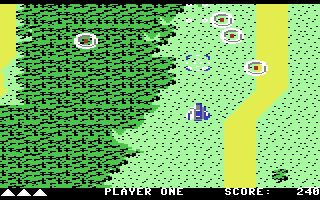
------------------------------------------------------------------------------
SCENARIO

Many eons ago, an advanced
technologically-orientated civilisation
was forced to evacuate Earth prior to
the Ice Age.
Now, these Xevious people are returning
to reclaim their heritage through
conquest. From the controls of your
Solvalou super spacecraft, you must
defend Earth from takeover by the
Xevious invaders! Flying a search and
destroy mission, you will cruise over
the scrolling landscape, bombing Xevious
ground entrenchments and zapping the air
targets that come into range. Easy.
But now look out for the flying mirrors
impossible to destroy; a collision will
spell certain death! In the event of
your surviving wave after wave of enemy
onslaughts you will encounter the
controlling force of the Xevious
offensive; the Andor Genesis Mother Ship
This is your goal. A direct hit to her
central reactor will disable her, but do
not be lulled into a false sense of
security. Xevious forces will soon
re-appear to renew their attacks with
increased determination!

GETTING TO THE OPTION SCREEN

Press the F1 key or the fire button to
display the option screen.
Note: if nothing is pressed within ten
seconds, the attract mode will start.
Simply press the fire button to return
to the first screen.

SELECTING OPTIONS

1.Press the F3 key for one or two
  players. Note:must have two joysticks
  for two players mode.

2.Press the F5 key for selecting the
  skill level - beginner, intermediate
  or advance.

3.Press the F1 key or the fire button to
  start game play. Note: if nothing is
  pressed within ten seconds,the attract
  mode will start. Simply press the fire
  button to return to the first screen.

JOYSTICK CONTROLS

1.Movement of Solvalou on the screen:
  * Move forward by pushing up on the
    joystick.
  * Move back by pulling down on the
    joystick.
  * Move on the right by pushing the
    joystick to the right.
  * Move to the left by pushing the
    joystick to the left.

2.Shooting of enemy craft:
  * Press the fire button to shoot at
    enemy craft.
  * For continuous fire simply hold down
    on fire button.
  * Rapid pressing on the fire button
    will fire numerous shots faster than
    holding down on the fire button.

3.Bombing of enemy ground targets:
  * Pull down on the joystick and press
    the fire button to shoot a bomb.
  * After bomb has been fired, release
    the fire button.
  * For continuous bombing simply hold
    down on the fire button and pull
    joystick back.

END OF THE GAME SCREEN

1.Pressing the F1 key will display the
  first screen.

2.Pressing the F5 key will display the
option screen.

3.Pressing the FIRE button three times
  will start the game play.
Note: after ten seconds the attract
mode starts. Simply press the fire
button once for the first screen, twice
for the option screen or three times for
game play.

OTHER KEYS

RUN/STOP - Pause
RESTORE - Initial screen
------------------------------------------------------------------------------
Some useful keyboard shortcuts
------------------------------------------------------------------------------
       [PAUSE] - stop/continue game
          [F9] - quick load game state
         [F12] - quick save game state (still stored after leaving the site)
         [F11] - toggle fullscreen mode
  [ScrollLock] - quick switch control ports
    [PageDown] - make a screenshot (320x200)