Dig Dug
arcade coin-up game for Commodore 64, 1983
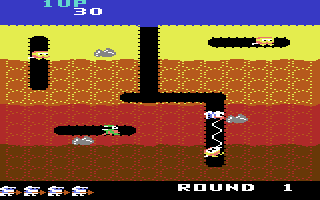
------------------------------------------------------------------------------
How many veggies can Dig Dug dig ? Dodge
and blast the perilous Pookas and bounce
boulders on the fiery Fygars as you
borrow your way through a subterranean
maze of deadly passages. Fruits and
veggies are your passion, but it's a
dangerous business trying to farm
surrounded by the deadly denizens of the
deep! Dig it!

FEATURES

* Exciting arcade-quality graphics and
  sound.
* The complete arcade game on your home
  computer.
* Action, danger and excitement.

THE GAME

Dig Dug starts each game with five
lives. After he burrows to the center of
the earth on his own, use the controls
to send him anywhere you want. When he
enters a tunnel where a Pooka is
lurking, the monster will give chase.
The Pooka can be exploded by quick use
of the pump. A brief contact with the
pump will stun the beast, and longer
contact will inflate it until it
explodes. Be careful trying to slip past
a stunned monster. If Dig Dug is
touched, he gets stunned himself.

Fygars can be handled in almost the same
way, but since they breathe fire, you
must be far more careful with your
approach. In fact, a Fygar's fire will
even burn through the earth, so make
sure you're well out of range.

Another attack is to drop rocks on the
creatures. To do this, just tunnel under
a rock while a monster is chasing you.
If your timing is right, the monster
will get squashed.

Pookas and Fygars are very strange
creatures. If they aren't destroyed
quickly in the round, they turn into
ghosts and start attacking directly
through the earth. They rematerialize as
soon as they enter a new tunnel.

After two rocks have fallen in any
round, bonus veggies appear in the
center of the earth and stay there for
ten seconds. If Dig Dug can get to them
in time, bonus points will be awarded.

CONTROLS

Joystick in Port 1.
To move push UP, DOWN, LEFT and RIGHT
To activate the pump press FIRE BUTTON.

MENU-KEYS

[F1] Starts the game.

[F3] Choose between a one- or two-player
     game.

[F5] Choose from the ten difficulty
     levels.

GAME-KEYS

[SPACE BAR] Pauses game.
            Move stick to continue.

[RESTORE] back to menu.
------------------------------------------------------------------------------
Some useful keyboard shortcuts
------------------------------------------------------------------------------
       [PAUSE] - stop/continue game
          [F9] - quick load game state
         [F12] - quick save game state (still stored after leaving the site)
         [F11] - toggle fullscreen mode
  [ScrollLock] - quick switch control ports
    [PageDown] - make a screenshot (320x200)