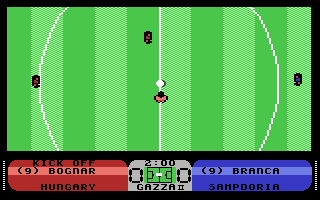
Gazza II
two player football game for Commodore 64, 1990
------------------------------------------------------------------------------
JOYSTICK CONTROLS

The direction of the kick is decided by the joystick direction as shown below.
NB: The kick is decided by the joystick direction at the moment the fire
button is released.

RUNNING PLAYER FACING UP
Up - Low Drive
Up+Right - Bend Right
Right - Cross 90 Right
Right+Down - Chip & Bend Right
Down - Chip
Down+Left - Chip & Bend Left
Left - Cross 90 Left
Left+Up - Bend Left

STATIONARY PLAYER FACING UP
Up - Low Drive
Up+Right - Drive Bend Right
Right - Bend Right
Right+Down - Chip & Bend Right
Down - Chip
Down+Left - Chip & Bend Left
Left - Bend Left
Left+Up - Drive Bend Left

CONTROLS
= - Game Pause if in free play.
= - Enter Management Section if at Set Piece.

The joystick control is as above but with the following enhancements: If
neither team has the ball and the ball is in the air then pressing fire will
cause the player to jump to try and head the ball.

EXTRA FEATURES

MAIN MENU
Up/Down - moves the highlight

Left/Right - Changes the current option. In the case of the Team/Control
menus, Left changes the team & Right changes the control.

Level
determines skill of computer teams, match length default settings, pitch types
available, extra time or penalties. Tournament level will select the pitch
and wheather randomly.

Team
Names may be edited via the keyboard

Continue
game only if match has commenced and the teams have not changed.

Restart
allows you to play a new game with the same teams.

SQUAD SELECTION

The player must pick 10 squad members to form his starting line-up
(the goalkeeper is selected automatically) and 4 for the subs bench.

* Pick allocates player from chosen squad position (A to T) to highlighted
  team position.
* Copy transfers player from adjacent squad position to highlighted team
  position.
* Next moves to next team position.
* Drop removes currently highlighted player to squad.
* Done fills any empty positions from the adjacent squad positions. If the
  adjacent position is vacant then the user must pick a player manually.

ABBREVIATIONS

* Player Classes:
(A)ttacker
(M)idfield
(D)efender

* Attributes:
(S)tamina
(R)unning
(K)icking
(P)assing
(C)control ball
(T)ackling

MANAGEMENT DISPLAY

Pressing FIRE cycles betwwen management screens for the two teams plus a
combined statistics screen.

Player information

- In addition to the 6 attributes each player has a column for injury (I) and
  booking (B).

I Column:
H = hurt: minor stamina and running reductions.
I = Injured: minor stamina and running reductions.

B Column:
W = Player Warned
B = Player Booked

NB: if a player is sent off then he will be absent from the list.

Tactics/Subs:
Up/Down - moves the highlight bar.
Left/Right - changes the tactics if selected.

Substitutions are made by highlighting the desired sub, moving the joystick
left, then repositioning the highlight over the player to be replaced and
moving the joystick right.

Statistics screen
Left/Right - moves the highlight.

KICKING

The strength of a kick is determined by the power bar at the bottom of the
screen. This increases as the joystick button is held down but wraps around
to zero if held too long. The direction of the kick is determined by the
joystick layouts given.

TACKLING

If your controlled player does not have the ball, then pressing the fire
button will attempt a sliding tackle. BE CAREFUL, tackling someone without
the ball is liable to get you into trouble!

GOALKEEPERS

The goalie is automatically controlled by the computer!

SPECIAL NOTES

* At half-time you change ends!
* Press "S" during a match to make a substitution!
------------------------------------------------------------------------------
Some useful keyboard shortcuts
------------------------------------------------------------------------------
       [PAUSE] - stop/continue game
          [F9] - quick load game state
         [F12] - quick save game state (still stored after leaving the site)
         [F11] - toggle fullscreen mode
  [ScrollLock] - quick switch control ports
    [PageDown] - make a screenshot (320x200)