Hungry Horace
arcade collect'em up game for Commodore 64, 1983
------------------------------------------------------------------------------
SCENARIO

The original Horace game is now
available for the C-64! Horace creates
havoc in the park as he picks the
flowers, annoys the guards and steals
their lunch. Fast, challenging, and fun
to play. "Horace has made such an
impression that his games deserve to be
classed in a genre by themselves." -
Personal Computer News PLUS - The C64
Horace contains a unique feature that
allows you to design your own mazes!

STARTING PLAY

"Hungry Horace" has a built-in
demonstration mode, which allows you to
see what the various stages of the game
look like.

To see the demonstration mode, simply
let the game run - after 30 seconds of
displaying the title page, the game will
enter demonstration mode.

To return to the title page from
demonstration mode, press any key
(other than [CTRL] or [T]) or the
joystick fire button.

To start play, press any key (other than
[CTRL] or [T]) or the joystick fire
button while the title page is
displayed.

"Hungry Horace" is a machine language
game for the Commodore 64. You are
Hungry Horace, intent on devouring
everything in your path. Horace will
move along the paths, bridges and
tunnels of the park by using the
joystick (Port 2) or the following keys:

[Q] - Up
[Z] - Down
[I] - Left
[P] - Right

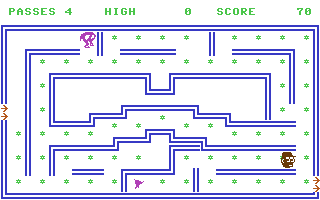
Each flower in the park that Horace eats
scores 10 points. But beware of the park
guards who are out to catch Horace and
throw him out of the park. If Horace is
caught 4 times, he will not be allowed
back in the park and the game will end.

There are several alarm bells in the
park. If Horace can steal one of the
alarms, the guards will panic. If Horace
can catch them when they are in panic,
they will flee from the park.

Look out for when one of the guards
drops his lunch of cherries or
strawberries. You will score 120 points
if Horace eats the guard's lunch.

The park is divided into 4 sections and
in each section there is an exit leading
to the next section. Horace does not
need to eat all the flowers or reach the
bell before entering the next section.

Each section of the park is harder than
the one before. Upon exiting the fourth
section you re-enter the first section,
with the action getting progressively
faster and the guards progressively
meaner.

Upon reaching 10,000 points you will be
rewarded with an extra pass for Horace.

The game may be paused at any time by
hitting the [C=] key. The action may be
started again by hitting any key or
pressing the trigger.

DESIGN YOUR OWN MAZES

Hitting the [CTRL] key when the title
page is displayed will put you in the
maze editor. This is used to design and
save your own mazes.

You will be initially confronted with
a menu. Simply move the cursor to the
desired option using the joystick or the
previously mentioned keys, and then hit
[F1] or press the trigger.

EDIT MODE

You will be prompted to either clear the
screen or restore a previously defined
maze.

Use trigger or [F1] key to progress
through maze attributes, i.e. walls,
flowers, entrances, exits, bells,
tunnels.

ALL cursor movement is same as that
for HORACE.

WALL attribute mode - the cursor can
be in any of three modes:

* PLOT  [F3] - draws walls.

* ERASE [F5] - erases walls and flowers.

* SKIP  [F7] - moves over screen,
               leaving everything
               untouched.

FLOWER attribute - same as above except
a flower will only be drawn or erased
when the trigger is pressed or [SHIFT]
key is hit. (For continued drawing use
[SHIFT/LOCK]).

BELL - move bell to desired position
then press trigger or hit [F1].

N.B. Bell CANNOT be drawn over tunnels.

TUNNELS - you may have either one or two
sets of tunnels.

The tunnel is represented by a block
with arrows at one end. Horace will
enter the tunnels in accordance with
these arrows (and exit in the opposite
direction). Move tunnel cursor to
desired position and press trigger or
hit [F1]. Tunnels are two way, i.e. if
you enter one orange tunnel you will
exit through the other orange one and
vice versa.

N.B. Tunnels CANNOT be drawn over each
other or on the bell.

When you have finished designing your
own maze, you will be prompted to save
it to the appropriate section of the
park. If you hit [Y], then your design
will be saved to memory, and any
previous design of yours for that
section of the park will be overwritten.

LOAD/SAVE MODES

You may save or load any one maze or all
mazes at once. You will be asked for a
filename. If a name is not desired then
simply hit [RETURN].

PLAYING OWN CREATED MAZES

The key [T] is used to toggle between
the standard park and your own
customised mazes. You do not need to
redefine all four mazes before toggling.
The game will only use those mazes that
are redefined, substituting the normal
sections of the park otherwise.

This toggle key [T] can be pressed when
the title page is displayed or in
demonstration mode.

NOTE that the demonstration mode will
attempt to play using your own
customised mazes if the toggle key has
been pressed.

RESTARTING THE GAME

Pressing [RUN/STOP] + [RESTORE] at any
stage during play will return you to the
title page.
------------------------------------------------------------------------------
Some useful keyboard shortcuts
------------------------------------------------------------------------------
       [PAUSE] - stop/continue game
          [F9] - quick load game state
         [F12] - quick save game state (still stored after leaving the site)
         [F11] - toggle fullscreen mode
  [ScrollLock] - quick switch control ports
    [PageDown] - make a screenshot (320x200)